
This reference explains the fields, terms, and landing page URL variables used by Campaign Tracker and how each value helps identify advertising traffic, campaigns, ads, referrals, and conversions.
TraceMyIP Campaign Tracker works by creating custom landing page URLs that contain information about an advertising campaign. When a visitor follows one of these URLs to a tracked page, the available campaign information can be associated with that visitor and displayed with the campaign statistics.
For the most useful reporting, complete as many applicable Campaign Tracker fields as possible. Some values are fixed information that you enter yourself, while others can be variables that an advertising provider replaces dynamically when an ad is clicked.
📈 Sign Up now to instantly track website visitors IPs!
How Campaign Tracker landing page variables work
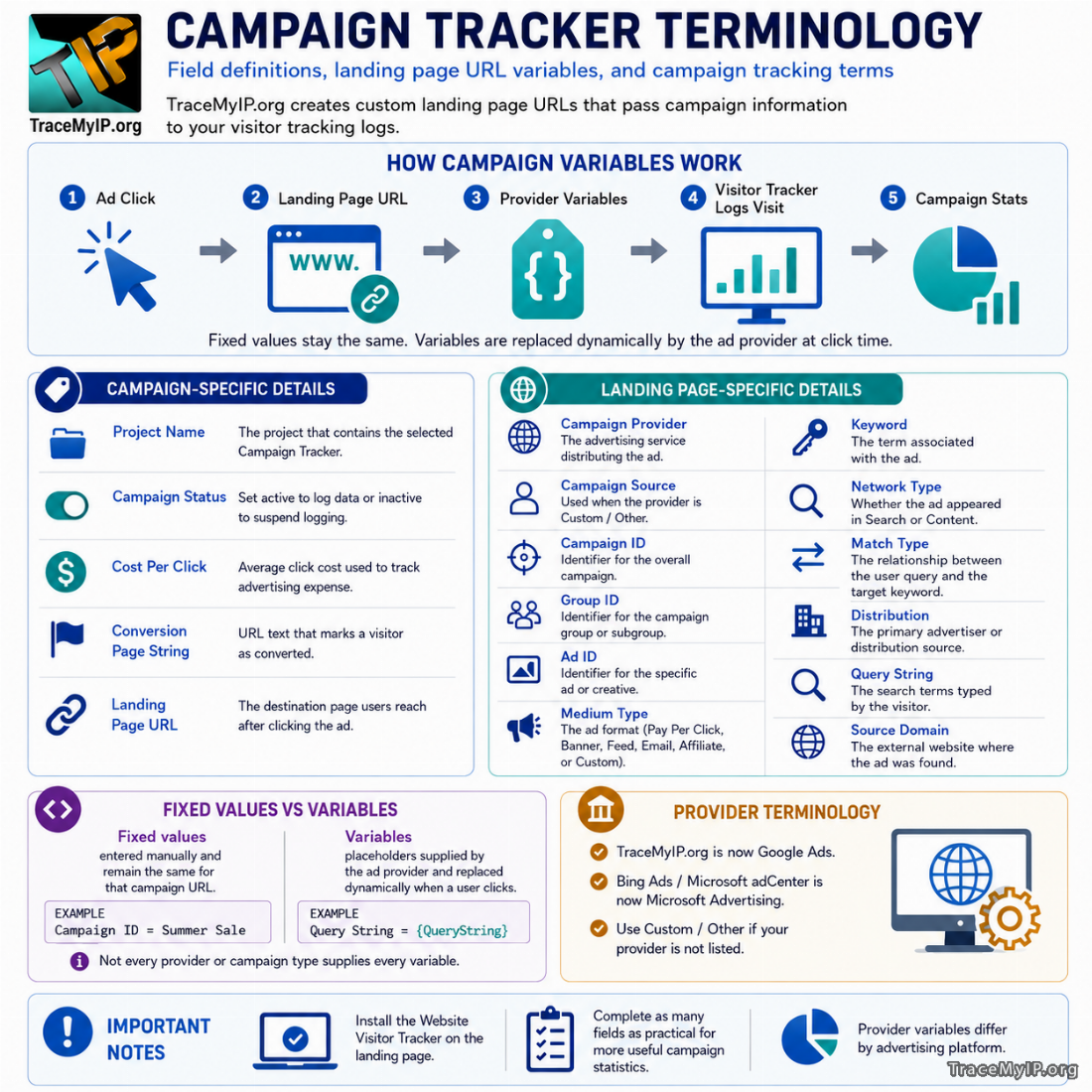 A normal landing page URL identifies the page a visitor should reach. A campaign tracking URL adds information that describes the advertising source or the particular campaign interaction.
Some campaign values remain constant. For example, you might assign the same Campaign ID to every advertisement belonging to one campaign. Other values can change for every click. An advertising provider may dynamically supply an ad ID, keyword, match type, search query, or other value when it sends the visitor to your website.
Campaign Tracker uses these values to organize visits into meaningful campaign statistics. The Website Visitor Tracker must be installed on the destination page so that the visit and available campaign information can be recorded.
There are two basic types of campaign values:
- Fixed values are entered directly by you and remain the same for every visitor using that particular campaign URL.
- Variables are placeholders supported by an advertising provider. The provider replaces the placeholder with the appropriate value when the advertisement is clicked.
Not every advertising service supplies every type of information, and not every campaign type produces keywords, search queries, match types, placements, or similar values. Only use fields that apply to the way the advertisement is delivered.
Campaign-specific details
Campaign-specific fields define the overall Campaign Tracker rather than one particular advertisement. These settings normally remain associated with the tracker while you generate different landing page URLs for ads belonging to the same campaign.
| Field | Definition and use |
|---|---|
| Project Name | The name of the TraceMyIP project containing the currently selected Campaign Tracker. Campaign tracking is organized within the project whose website receives the campaign traffic. |
| Campaign Status | Controls whether Campaign Tracker is actively logging the campaign. Set the campaign to Active when it should collect campaign data. Set it to Inactive when you want to suspend campaign logging without removing the campaign configuration. |
| Cost Per Click | The average amount you pay when someone clicks an advertisement associated with the Campaign Tracker. The value is used to calculate and manage advertising expenses associated with campaign activity. |
| Conversion Page String | A text value that identifies a conversion page or conversion state. When that text is found in a URL, the visitor can be marked as converted. Examples include part of a thank-you page URL, receipt page URL, confirmation page, or another string that appears after a successful conversion. This field is not required when the applicable conversion setup uses JavaScript code. |
| Landing Page URL | The base URL of the page visitors should reach after clicking your advertisement. This page must contain the Website Visitor Tracker if the campaign visit is to be recorded. |
Campaign Status
Campaign Status is useful when a campaign is temporarily stopped but its existing configuration should remain available. Setting the tracker to inactive suspends logging. Reactivating it allows campaign logging to continue.
Cost Per Click
Cost Per Click should represent the average click cost that you want associated with the Campaign Tracker. The advertising platform’s actual charge can vary from click to click, so this field is most useful as the campaign cost value you want Campaign Tracker to use for expense calculations.
Do not confuse Cost Per Click with a visitor’s value or a conversion value. It represents advertising cost rather than revenue.
Conversion Page String
The Conversion Page String lets Campaign Tracker recognize a conversion based on the URL a visitor reaches. For example, if a completed order sends visitors to a URL containing a distinctive string such as order-complete, that text can serve as the conversion indicator when it is unique to successful conversions.
Choose a string that does not normally occur on unrelated pages. A very broad value could cause ordinary page views to be interpreted as conversions.
Landing Page URL
The Landing Page URL is the actual destination associated with the campaign. It should lead to content that is relevant to the advertisement rather than simply directing every campaign to a general page.
The visitor tracker must be installed on the landing page. Installing the Website Visitor Tracker throughout the website is preferable because visitors may arrive on different campaign pages or navigate away from the original landing page after entering the site.
Landing page-specific campaign details
Landing page-specific fields describe the advertising source, campaign structure, individual ad, targeting information, and referral context associated with a generated campaign URL.
| Field | Definition and use |
|---|---|
| Campaign Provider | The advertising service or traffic provider distributing the advertisement. Selecting a preset provider can allow Campaign Tracker to automatically populate supported variables and hide fields that are handled automatically. Use Custom / Other when the required provider is not available as a preset. |
| Campaign Source | The name of the campaign or traffic provider. This field is displayed when Custom / Other is selected as the Campaign Provider. |
| Campaign ID | The identifying value assigned to the overall campaign. It should remain consistent across landing page URLs that belong to the same Campaign Tracker. |
| Group ID | An identifier for a campaign group, ad group, subgroup, or similar organizational level within the campaign. |
| Ad ID | An identifier for the individual advertisement, creative, or variation for which the landing page URL is being generated. |
| Medium Type | The form in which the advertisement or campaign link is delivered. Presets include Pay Per Click, Banner, Feed, Email, and Affiliate. A custom medium can be entered when another advertising format is being tracked. |
| Keyword | The campaign keyword associated with the advertisement. For paid search advertising, this normally refers to the keyword or targeting term configured in the advertiser’s account rather than necessarily the exact words entered by the visitor. |
| Network Type | Describes the general environment in which the advertisement appeared, such as a search results page or content on another website. |
| Match Type | Describes how a visitor’s search relates to the advertiser’s targeted keyword when the campaign provider supplies this information. This field is used as a variable. |
| Distribution | The primary advertiser or distribution source associated with the campaign traffic. Depending on the provider, this may identify the provider itself or another distribution source. |
| Query String | The actual search terms entered by the visitor when the advertising provider makes that information available. This field is used as a variable. |
| Source Domain | The external website or domain where the advertisement appeared when that information is available. |
Campaign Provider and Campaign Source
Campaign Provider and Campaign Source identify where the advertising traffic originates, but they serve slightly different purposes.
Campaign Provider is the provider selection used by Campaign Tracker. When a supported preset is selected, the system can automatically configure fields associated with that provider. Campaign Source is used when you select Custom / Other and need to identify the source yourself.
Provider names can change over time. For example, documentation or older interfaces may refer to Google AdWords, which is now called Google Ads, or Microsoft adCenter and Bing Ads, which are now known as Microsoft Advertising. These naming changes do not change the purpose of the Campaign Provider field.
Campaign ID, Group ID, and Ad ID
These three fields form a hierarchy that can help distinguish traffic at different levels of an advertising campaign.
- Campaign ID identifies the overall campaign. Example:
My Sock Store. - Group ID identifies a subgroup of ads within that campaign. Example:
White socks. - Ad ID identifies the individual advertisement. Example:
White crew socks - medium.
The values do not have to be human-readable names if your advertising provider supplies numeric or encoded identifiers. What matters is that they consistently distinguish the campaign levels you want to analyze.
When Campaign Tracker uses a provider variable for one of these fields, the advertising service can supply the actual ID dynamically rather than requiring a separate fixed URL for every value.
Medium Type
Medium Type describes how the advertising message or campaign link reaches the visitor. This helps separate campaigns that may use the same provider but different advertising formats.
Available preset types include:
- Pay Per Click for paid advertisements charged or managed around clicks;
- Banner for graphical or display advertising;
- Feed for campaign links distributed through feeds;
- Email for links included in email campaigns;
- Affiliate for traffic generated through affiliate campaigns; and
- Custom for another medium that does not fit the available presets.
For example, a classified advertising campaign could use a custom medium such as classifieds.
Keyword, Query String, and Match Type
These fields are related but should not be treated as interchangeable.
Keyword generally represents the term configured in the advertiser’s campaign. This is the keyword or targeting term associated with serving the advertisement.
Query String represents the words entered by the person performing the search when the campaign provider makes that value available.
Match Type describes how the search interaction matched the advertiser’s keyword or targeting configuration.
For example, an advertiser could target a keyword related to white socks while a visitor enters a longer or slightly different search. The Keyword field identifies the advertiser-side targeting term, while Query String can identify the visitor’s actual search when the provider supplies it.
Modern advertising platforms do not necessarily provide keyword, search-query, and match information for every campaign or every click. Automated, audience-driven, placement-based, shopping, and keywordless campaign types may not have conventional keyword data. Privacy and platform reporting rules can also affect which values are available. A missing value therefore does not automatically indicate a Campaign Tracker problem.
Network Type, Distribution, and Source Domain
These fields provide context about where an advertisement was delivered.
Network Type describes the general advertising environment. The Campaign Tracker terminology distinguishes between search-related placement and content displayed on another website.
Distribution identifies the primary advertiser or distribution source. Depending on the advertising provider and campaign, this may identify the provider’s own network or another distribution channel.
Source Domain identifies the external website on which an advertisement was found when the provider supplies that information.
These values are especially useful when one campaign can appear across several types of inventory. However, the amount of placement information available depends on the campaign provider and the type of advertisement involved.
What Use Variable means
The Use variable option tells Campaign Tracker that a field should contain a provider-supported placeholder rather than a fixed value.
When an advertising provider processes a click, it replaces its variable with the actual value associated with that click. The resulting landing page request can then carry that value to Campaign Tracker.
For example, Microsoft Advertising supports provider variables that can insert campaign-related information into URLs. An example from Campaign Tracker terminology is {QueryString}, which represents search-query information when that value is available from the provider.
The general process is:
- Campaign Tracker places the appropriate variable into the generated landing page URL.
- The advertisement uses that URL as its campaign destination.
- The advertising provider processes the click.
- The provider substitutes its variable with the value associated with the click.
- The visitor reaches the landing page with the campaign information included in the URL.
- The Website Visitor Tracker records the visit and Campaign Tracker processes the available campaign data.
When a preset Campaign Provider is selected, Campaign Tracker can automatically fill supported variables for applicable fields. Some automatically managed fields may consequently be hidden from the setup form.
Fixed values versus variables
Use a fixed value when every visitor using a particular campaign URL should receive the same identifier. Use a variable when the advertising provider needs to substitute a different value for individual clicks, ads, keywords, queries, or other campaign attributes.
| Value type | Best suited for | Example |
|---|---|---|
| Fixed | Information that stays constant for a particular campaign URL | Campaign ID = Summer Sale |
| Variable | Information supplied dynamically by the campaign provider | Query String = {QueryString} |
Variables are specific to the advertising provider. Do not assume that a variable used by one provider will work with another. Provider syntax and available tracking parameters can also change over time.
If a provider is available as a Campaign Tracker preset, use the variables supplied by that preset. For a Custom / Other provider, consult that provider’s current URL tracking documentation to determine which dynamic variables it supports.
Current advertising terminology and variable behavior
Campaign tracking terminology has changed as advertising platforms have evolved. Older references to Google AdWords should be read as Google Ads, and Microsoft adCenter or Bing Ads should be read as Microsoft Advertising.
Modern platforms commonly describe the destination page as the final URL and may separately support tracking parameters, URL suffixes, tracking templates, or provider-specific dynamic parameters. Campaign Tracker’s purpose remains the same: the advertising click must ultimately deliver the campaign information needed by the generated landing page URL.
Provider variables should also be treated as external values rather than permanent Campaign Tracker terminology. A provider can add, change, limit, or discontinue its parameters independently. This is especially important for fields such as Keyword, Match Type, Query String, Network Type, and Source Domain.
If a variable stops producing data, first verify that the advertising provider still supports that parameter for the campaign type you are running. A correctly generated Campaign Tracker URL cannot record a value that the advertising platform did not supply.
Choosing useful campaign values
A complete campaign URL can contain many fields, but useful campaign tracking depends on consistency more than complexity.
When naming fixed fields such as Campaign ID, Group ID, and Ad ID:
- use values that clearly distinguish one campaign from another;
- use the same Campaign ID across landing page URLs belonging to the same campaign;
- use Group ID when you need to compare meaningful groups within the campaign;
- use Ad ID when individual advertisements should be analyzed separately;
- avoid changing naming conventions halfway through a campaign unless necessary; and
- use provider variables where dynamic values are more appropriate than manually creating many nearly identical URLs.
After generating a landing page URL, test the campaign configuration and verify that the Website Visitor Tracker is installed on the destination page. If a field is expected to contain a dynamic provider value, confirm that the actual advertising click supplies it before relying on that field for campaign analysis.
🌍 Who visits your website? Sign Up now to find out instantly!